Your business probably does not need another AI tool.
It probably needs fewer repetitive tasks.
That difference is important.
Businesses are experimenting with ChatGPT, AI assistants and dozens of automation platforms, yet employees still manually copy website leads into CRMs, prepare repetitive quotations, answer the same support questions, update spreadsheets and chase prospects who never received a follow-up.
That is where AI automation services for small businesses become useful.
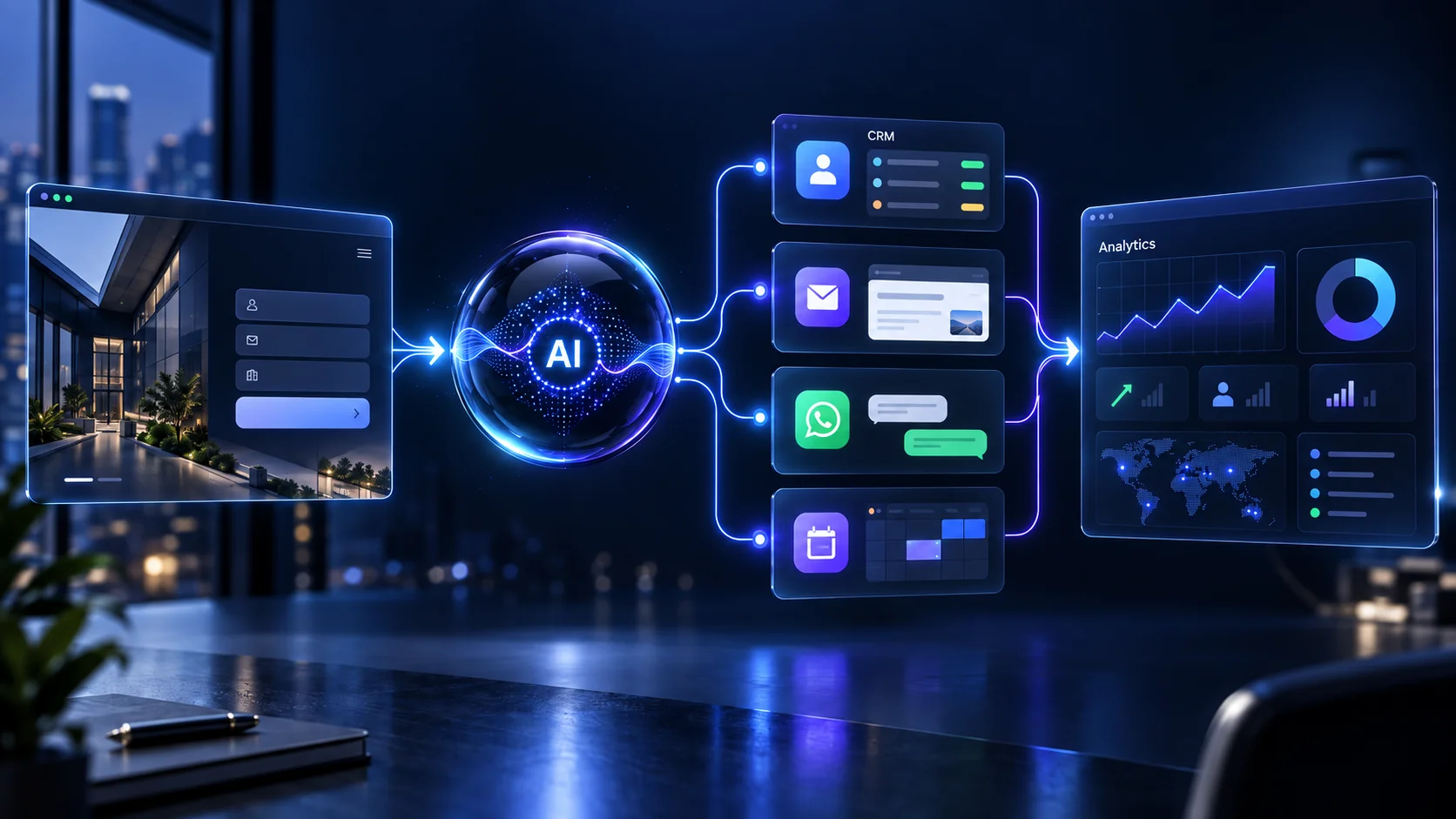
Instead of simply generating text, AI can become part of an actual workflow that receives information, understands it, applies business rules, updates another system and involves a person when human judgment is required.
For a current view of how small and midsize businesses are adopting AI, see the 2026 Intuit QuickBooks AI Impact Report.
At NRS Technologies, we focus on connecting AI to real applications and business processes instead of treating AI as a decorative chatbot.
Here are nine workflows businesses should consider automating first.
1. Website Lead Capture and Qualification
Consider what happens when a potential customer submits a website enquiry.
In many companies, the process looks something like this:
Website form → email notification → employee reads email → employee identifies service → CRM entry → salesperson assignment → response → follow-up reminder.
Most of those steps are repetitive.
An AI-enabled workflow could instead operate like this:
Website enquiry → AI analyses requirement → lead is classified → CRM updated → salesperson assigned → personalized acknowledgement generated → follow-up scheduled.
Your salesperson becomes involved where conversation, negotiation and judgment actually matter.
The automation handles repetitive administration.
This kind of workflow can be integrated directly into a custom website or application built through our web development services.
What Can Be Automatically Identified?
- Service required
- Industry
- Approximate project type
- Location
- Urgency
- Budget range, if provided
- Whether the enquiry appears relevant
- Which salesperson should receive it
The objective is not to let AI decide which customers matter.
The objective is to make sure every genuine enquiry reaches the right person quickly and consistently.
2. Automated Sales Follow-Up
Many potential customers disappear because nobody followed up at the right time.
A lead might submit an enquiry on Monday.
An employee responds once.
The customer gets busy and does not reply.
The enquiry is forgotten.
A simple automation can create a structured follow-up sequence:
- Immediate enquiry acknowledgement
- CRM record creation
- Salesperson notification
- Follow-up after a defined period
- Second reminder when appropriate
- Stop sequence when the prospect replies
- Escalation when a high-intent response arrives
The communication can still sound human because messages can use the original enquiry and CRM information as context.
AI should help your team respond more consistently, not bombard prospects with generic spam.
3. Customer Support Triage
AI does not need to replace your support team.
A better use is removing repetitive requests that consume your team’s time.
A support automation can identify questions such as:
- Where is my order?
- Can I cancel my order?
- Has my refund been processed?
- How do I reset my password?
- Which plan am I using?
- How do I update my profile?
- Is this product available?
The system can retrieve information from approved sources and respond when the answer is straightforward.
More complicated or sensitive cases can be escalated directly to a person.
This is particularly powerful for online businesses where customer experience depends on several systems. Our eCommerce development services cover payment, inventory, order and marketplace workflows that can become part of a wider automation system.
4. CRM Data Entry and Updating
Sales teams should spend their time talking to prospects, understanding requirements and closing business.
They should not spend hours copying information between email, forms, spreadsheets and a CRM.
AI automation can assist with tasks such as:
- Creating new leads
- Extracting contact details
- Summarizing enquiries
- Updating lead stages
- Creating follow-up tasks
- Assigning leads
- Summarizing meetings
- Writing notes into customer records
For sensitive changes, a workflow can prepare the update and wait for a salesperson to approve it.
This approach combines automation with control.
5. Proposal and Quotation Generation
Service businesses often produce documents that follow similar structures repeatedly.
A customer shares requirements.
An employee reads the message.
They identify relevant services.
They copy information into a proposal.
They change the introduction, scope and pricing.
They export the document and send it.
AI can shorten the repetitive portion of that workflow.
A system could follow:
Lead enquiry → requirement extraction → service identification → scope draft → proposal generation → human review → PDF → email.
The important part is the human review.
AI should not independently commit your company to prices, deadlines or contractual terms unless you have deliberately designed strict rules allowing it to do so.
For businesses already redesigning their customer or employee workflows, good UI/UX design is also important because automation is only valuable when users understand what the system is doing and where their approval is required.
6. Invoice and Document Processing
Many businesses repeatedly receive PDFs, invoices, purchase orders, applications, reports and forms.
Employees manually open the files and transfer information into another system.
AI-enabled document processing can extract structured information such as:
- Customer name
- Invoice number
- Purchase order
- Date
- Amount
- Product or service
- Email address
- Reference number
- Payment status
The extracted data can then be sent to a database, CRM, ERP or internal dashboard.
When the system is unsure about a document, it can send that case to a person for verification rather than blindly continuing.
That human fallback is an important part of reliable automation.
7. Appointment Scheduling and Reminders
Scheduling becomes surprisingly time-consuming when a business handles many enquiries.
A properly designed workflow can:
- Understand what appointment the customer needs
- Collect required information
- Check available times
- Offer suitable slots
- Create the booking
- Send confirmation
- Send reminders
- Allow rescheduling
- Update the CRM
This can work for:
- Sales calls
- Software demonstrations
- Consultations
- Interviews
- Service appointments
- Training sessions
The same workflow can also connect to a mobile product. Businesses requiring push notifications, location functionality or customer-facing apps can explore our mobile app development services.
8. eCommerce Order, Cancellation, Return and Exchange Automation
eCommerce operations contain many repetitive workflows.
A customer might ask:
“Where is my order?”
“Can I cancel it?”
“Has my refund started?”
“Can I exchange this item?”
“Do you have another size?”
Most answers already exist somewhere inside the order-management, payment, shipping or inventory system.
A well-designed AI automation can securely retrieve the relevant information and respond according to business rules.
A more advanced flow might look like:
Customer request → identify order → verify account → check shipping state → apply cancellation/return rules → perform approved action → update systems → send confirmation.
If the request falls outside normal policy, the workflow can create a ticket for a human employee.
Businesses planning a more flexible commerce architecture can also read our guide to headless commerce development.
9. Internal Company Knowledge Assistant
Information inside a company is usually scattered across multiple places:
- Google Drive
- PDF files
- SOP documents
- Policies
- Product manuals
- CRM notes
- Internal databases
- Knowledge bases
- Support tickets
Employees repeatedly search for answers that already exist somewhere.
An internal AI assistant can make approved company information searchable using natural-language questions.
An employee might ask:
“What is our refund policy for international customers?”
“What documents are required before onboarding a new vendor?”
“What information do I need before sending a software development quotation?”
The application can search approved information sources, retrieve relevant content and generate a clear answer.
Permissions are critical.
Employees should only receive information they are authorized to access.
AI Automation Is Not the Same as a Chatbot
This is one of the biggest misunderstandings businesses have about AI.
A basic chatbot typically works like:
User asks question → AI generates answer.
An AI automation or agentic workflow can operate more like:
Goal → understand context → retrieve information → make permitted decision → call tool → update system → verify result → escalate exception.
For example, a chatbot may explain how to book a consultation.
An automated workflow could qualify the prospect, identify the required consultation, check availability, create the appointment, update the CRM and notify the salesperson.
If you are considering that level of automation, read our detailed guide explaining what production AI agents actually require.
What Should a Small Business Automate First?
Do not begin with:
“Where can we use AI?”
Begin with:
“Which repetitive process currently consumes the most time or causes the most missed opportunities?”
A strong first automation generally has several characteristics.
It Happens Frequently
Automating something performed once every six months may provide little value.
The Process Has Clear Rules
If experienced employees already follow a predictable sequence, the workflow may be easier to automate.
The Required Information Is Digital
Automation works best when the information already exists in databases, APIs, forms, documents or applications.
The Initial Risk Is Manageable
Start with something where errors can be detected and corrected.
Lead classification, for example, is generally more suitable for early automation than authorizing a large financial transaction.
What Should You NOT Fully Automate?
More automation does not automatically mean a better business.
Be particularly careful with workflows involving:
- Major financial approvals
- Legal commitments
- Sensitive personal data
- High-impact employment decisions
- Irreversible transactions
- Critical safety decisions
AI can still help prepare information, summarize documents or recommend next steps, but appropriate human oversight should remain part of high-risk workflows.
What Does an AI Automation System Actually Contain?
A production system may contain several layers.
Trigger
An event starts the workflow, such as a form submission, incoming email, order or uploaded document.
Application or Workflow Layer
This controls the steps that should happen next.
AI Model
The model may classify information, understand language, extract fields or generate content.
Business Systems
The workflow can connect with your CRM, website, database, eCommerce platform, calendar, ERP or other internal applications.
Business Rules
Your software determines what AI is and is not permitted to do.
Human Approval
Important decisions can be held until the appropriate person approves them.
Monitoring
Logs and alerts help identify failures and unusual behavior.
The surrounding software architecture often matters as much as the underlying AI model.
Why AI Automation Projects Fail
A common mistake is choosing an AI platform before understanding the business workflow.
The better order is:
Problem → workflow → data → rules → risk → technology.
Not:
AI tool → search for somewhere to use it.
For additional perspective on this issue, McKinsey discusses the importance of redesigning workflows around agentic AI in its article on how agentic AI can reshape workflows.
Other common problems include:
- Automating a broken process
- Poor-quality data
- No human fallback
- Giving AI excessive permissions
- No monitoring
- No evaluation
- Trying to automate everything immediately
- Relying entirely on prompts rather than application-level rules
AI Automation vs Traditional Software Automation
Not every workflow needs AI.
If a task follows completely predictable rules, traditional software may be cheaper and more reliable.
For example:
If payment status = successful → generate invoice
That is normal automation.
You probably do not need an AI model.
But if the application needs to understand an unstructured customer email and determine what the person is asking for, AI becomes much more useful.
The best systems often combine both:
AI for understanding + deterministic software for critical actions.
How NRS Technologies Approaches AI Automation
At NRS Technologies, we do not begin by asking:
“Which chatbot should we install?”
We begin with:
“What repetitive work is your business currently doing manually?”
Then we map:
- The existing workflow
- People involved
- Applications involved
- Data required
- Repeated decisions
- Exception cases
- Security requirements
- Approval requirements
- Potential automation points
Depending on the requirement, the solution might combine custom web application development, APIs, databases, AI models, workflow engines and existing third-party tools.
The goal is not to force your business into an AI platform.
The goal is to design automation around the way your business needs to operate.
You can review our selected digital projects to see the broader type of applications and technology solutions we work on.
Start With One Workflow
You do not need to automate your entire company at once.
Choose one process.
For example:
Website lead → AI qualification → CRM → personalized response → salesperson notification.
Launch it.
Then measure:
- Response time
- Employee hours saved
- Number of leads processed
- Error rate
- Conversion rate
- Manual steps removed
If the workflow creates measurable value, automate the next process.
This approach is easier to control, easier to measure and usually more practical than trying to transform the entire organization at once.
Need More Leads as Well as Better Automation?
Automation can improve what happens after prospects reach your business, but your company still needs a consistent way to attract those prospects.
NRS Technologies also provides digital marketing services across SEO, content, paid campaigns and other growth channels.
Combining acquisition with automated lead handling can create a more complete system:
Traffic → enquiry → qualification → CRM → follow-up → sales conversation.
Want to Find What Your Business Can Automate?
If your employees spend hours every week:
- Copying information between applications
- Following up with prospects
- Answering repetitive questions
- Creating similar documents
- Updating CRM records
- Processing forms
- Scheduling appointments
- Searching for internal information
there may be a valuable automation opportunity.
You do not need to know which AI model, framework or automation platform to choose.
Start by explaining the manual process.
NRS Technologies can help identify:
- What can be automated
- What should remain human
- Which integrations are required
- What AI architecture is appropriate
- How to implement the workflow in phases
Discuss your AI automation requirement with NRS Technologies →
Frequently Asked Questions
What are AI automation services?
AI automation services combine artificial intelligence, business rules, APIs and software workflows to automate repetitive processes such as lead qualification, customer support, document processing, CRM updates and follow-ups.
How can a small business use AI automation?
Small businesses can use AI for lead handling, scheduling, repetitive customer enquiries, proposals, CRM administration, document extraction, eCommerce support and internal knowledge retrieval.
Is AI automation the same as a chatbot?
No. A basic chatbot generally answers questions, while an AI automation system can interact with other software and complete multiple workflow steps.
Can AI automation work with an existing CRM?
In many cases, yes. Integration depends on whether the CRM provides APIs, webhooks, native integrations or another supported method of exchanging data.
Should customer service be completely automated?
Not necessarily. Routine questions can often be automated, while complex, sensitive or unusual cases should have a clear path to a human employee.
Which process should I automate first?
Start with a high-frequency, repetitive process that already follows reasonably clear rules and consumes meaningful employee time.
Final Thoughts
The success of AI automation should not be measured by how impressive the demo looks.
Measure what changes after deployment.
Did leads receive faster responses?
Did fewer enquiries disappear?
Did employees spend less time copying data?
Did customers receive answers sooner?
Did your team have more time for valuable work?
Those are useful AI outcomes.
If you can identify even one repetitive workflow inside your company, talk to NRS Technologies about automating it.