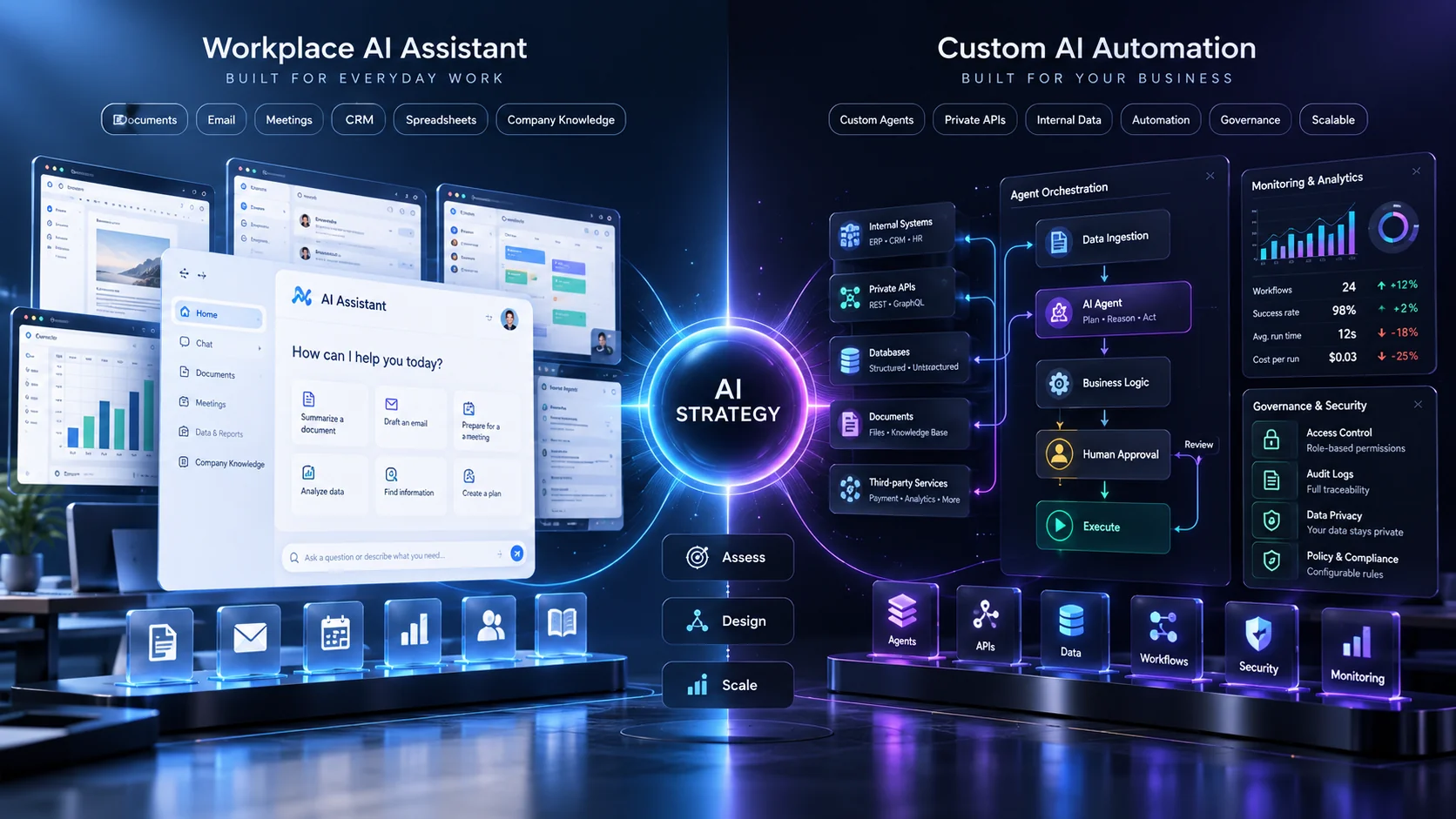
Microsoft is turning Copilot into much more than a workplace chatbot.
Its latest tools can understand business context, create applications and support AI agents that perform ongoing work.
That raises an important question for companies investing in AI.
Should you use Microsoft Copilot, or should you build custom AI automation?
On September 30, 2026, Microsoft began rolling out Work IQ in preview.
Work IQ connects Microsoft Copilot and AI agents with business context from Microsoft 365, Dynamics 365 and Power Platform.
Microsoft says this helps agents understand relationships between people, customers, transactions, workflows and business concepts.
You can read Microsoft’s official Work IQ announcement.
At the same time, Microsoft is introducing Code and Autopilot inside the new Copilot experience.
So, does your business still need custom AI development?
The answer depends on your workflow, existing software and how much control you need.
What Is Microsoft Work IQ?
Work IQ is Microsoft’s intelligence layer for Copilot and AI agents.
It connects AI experiences with the information a business already uses.
That can include:
- Microsoft 365
- Dynamics 365
- Power Apps
- Business data
- Organizational relationships
- Work context
According to Microsoft’s Work IQ product documentation, the goal is to give Copilot and agents a shared understanding of enterprise data and context.
This is important because an AI system becomes much more useful when it understands how the business actually operates.
What Is Custom AI Automation?
Custom AI automation connects AI models with specific business systems and workflows.
For example:
Website enquiry → AI qualification → CRM → proposal draft → salesperson approval → follow-up.
A custom system may connect:
- Your website
- CRM
- ERP
- Private database
- Payment system
- Internal APIs
The workflow is designed around your business rather than a single software ecosystem.
Microsoft Copilot vs Custom AI Automation: The Short Answer
If your company already runs heavily on Microsoft 365, Dynamics and Power Platform, Microsoft’s ecosystem can be extremely attractive.
It gives you enterprise identity, permissions and business context inside tools your employees already use.
However, custom automation becomes more valuable when your workflow spans systems outside Microsoft or requires unique business logic.
When Microsoft Copilot Is a Strong Choice
1. Your Company Already Uses Microsoft 365
If employees already spend their day inside:
- Outlook
- Teams
- Word
- Excel
- PowerPoint
then Copilot can fit naturally into existing work.
That reduces the need to train employees on an entirely separate AI interface.
2. You Use Dynamics 365
Work IQ becomes particularly interesting for businesses already using Dynamics.
AI can understand business context from customer and operational data instead of working only from a prompt.
For example, an agent may reason about:
- Customer relationships
- Sales opportunities
- Transactions
- Business processes
This can reduce the amount of custom integration work needed.
3. Governance Is a Major Concern
Large organizations care about permissions and governance.
Microsoft says Work IQ preserves existing security boundaries instead of simply duplicating enterprise data into an uncontrolled environment.
That can be important for companies with mature Microsoft identity and compliance setups.
What Is Microsoft Copilot Code?
Microsoft announced Code as part of the new Copilot experience in September 2026.
Code allows users to build applications and automations using natural language.
Microsoft says it runs in a sandboxed environment and can be hosted within the organization’s tenant.
The company is also previewing Copilot Managed Runtime for safely hosting those applications.
You can review Microsoft’s new Copilot announcement.
What Is Microsoft Autopilot?
Autopilot is Microsoft’s persistent agent concept.
Instead of waiting for a new prompt every time, the agent can continue working toward a defined goal.
Microsoft gives examples such as managing supplier-review workflows and following up with stakeholders.
The agent can work across tools such as Teams, Outlook, chats, channels and documents.
However, Autopilot is still being introduced through preview programs.
Therefore, businesses should not assume every capability is ready for unrestricted production use today.
Why Preview Status Matters
This is an important point.
Work IQ business applications are currently in preview.
Microsoft’s documentation explicitly notes that preview features may have limited functionality and are not intended for normal production use.
You can review the Microsoft Work IQ administration documentation.
Therefore, businesses should use controlled pilots rather than moving critical processes immediately.
When Custom AI Automation Is the Better Choice
1. Your Business Uses Many Non-Microsoft Systems
Imagine your company uses:
- Shopify
- Salesforce
- A custom ERP
- Shiprocket
- A PostgreSQL database
A custom automation layer may be easier when the workflow spans many unrelated systems.
You are not forced to redesign the business around one vendor.
2. You Need Complex Custom Logic
Some workflows require very specific rules.
For example:
If a customer cancels within 30 minutes, cancel the local order. If shipment creation already started, update the shipping platform. If payment was captured, trigger the correct refund workflow.
This is business logic.
A custom application gives developers more precise control over those rules.
3. You Need a Customer-Facing AI Product
Microsoft Copilot mainly focuses on workplace productivity and business processes.
If you want to build an AI feature directly into your customer product, custom development may make more sense.
Examples include:
- AI SaaS assistant
- Customer-support agent
- AI product search
- Document-analysis portal
- AI recommendation engine
Our custom web application development services can combine AI with frontend applications, backend APIs and business data.
4. You Need Full Model Choice
A custom architecture can let a company select the AI model based on the task.
That can help with:
- Cost
- Latency
- Reasoning quality
- Data requirements
- Model availability
You may even use different models for different workflows.
Microsoft Copilot vs Custom AI: Quick Comparison
| Requirement | Microsoft Copilot | Custom AI Automation |
|---|---|---|
| Microsoft 365 integration | Excellent | Possible through APIs |
| Dynamics context | Excellent with Work IQ | Requires integration |
| Custom ERP | Depends on connectors | Strong flexibility |
| Customer-facing AI product | Limited fit | Strong fit |
| Custom business logic | Good within ecosystem | Full control |
| Model flexibility | Platform-driven | High flexibility |
| Enterprise Microsoft governance | Strong | Must be designed |
Do You Need an AI Agent or Simple Automation?
Not every workflow needs an AI agent.
This distinction can save businesses a lot of money.
For example:
If payment succeeds → send invoice.
That is normal automation.
You do not need a reasoning model.
However:
Read this customer email, understand the request, check our records and decide which workflow should start.
That is a better use case for AI.
Our existing guide to production AI agents explains why the workflow around the model is usually more important than the chatbot itself.
Can Microsoft Copilot Replace Custom Software?
For some internal applications, yes.
That is exactly why business software is changing.
A company may no longer need a six-month development project for a simple internal dashboard.
However, that does not mean custom software disappears.
Customer-facing systems, complex integrations and unique business logic still benefit from custom engineering.
What About Data Security?
Security should be evaluated before any AI deployment.
Ask:
- Which data can the agent access?
- What can it modify?
- Which actions require approval?
- Where are actions logged?
- What happens when the agent fails?
- Can permissions be revoked quickly?
AI should not receive broader access than it actually needs.
Human Approval Is Still Important
An autonomous system should not automatically make every high-impact decision.
Human approval is particularly important for:
- Large payments
- Contracts
- Refund exceptions
- Legal commitments
- Sensitive HR decisions
- Destructive database actions
The best automation often combines AI speed with human control.
How Much Does Business AI Automation Cost?
The answer depends on integration complexity.
A simple automation may only require several workflows and an existing platform.
A more advanced system may need:
- Custom application development
- APIs
- Databases
- Authentication
- AI model usage
- Monitoring
- Human approval systems
Therefore, evaluate total business value rather than model cost alone.
Start With One Process
Do not begin by trying to automate the entire company.
Choose one measurable workflow.
For example:
Lead arrives → classify requirement → update CRM → create follow-up → notify sales.
Then measure:
- Response time
- Hours saved
- Errors
- Conversion rate
- Manual steps removed
This tells you whether the AI investment creates real value.
When Microsoft Copilot Is Probably the Best First Step
Copilot is a strong starting point when:
- Your company already uses Microsoft 365 heavily.
- You use Dynamics 365.
- Your workflows live in Microsoft tools.
- You want controlled internal AI pilots.
- Enterprise governance matters.
In those situations, rebuilding everything externally may create unnecessary complexity.
When Custom AI Development Is Worth It
Custom AI becomes more attractive when:
- Your business spans many platforms.
- Your workflow is unique.
- You need customer-facing AI.
- You require specialized APIs.
- You want model flexibility.
- AI itself is part of your product.
The decision should be based on architecture, not hype.
How NRS Technologies Builds Business AI Systems
At NRS Technologies, we start with the business process.
We do not start by forcing every company into the same AI platform.
First, we map:
- The workflow
- The people involved
- The applications involved
- The required data
- The decisions AI can make
- The actions that need approval
- The security boundaries
Then we decide whether the best solution is:
- Microsoft Copilot
- Existing automation software
- A custom web application
- A custom AI agent
- A hybrid architecture
This prevents businesses from spending money on AI where normal software would work better.
Want to Know Which AI Approach Fits Your Business?
You do not need to choose Microsoft Copilot or custom development before talking to a technical team.
Start by describing the workflow.
Tell us:
- What employees currently do manually
- Which software you use
- Where the data lives
- What result you want
From there, the right architecture becomes much easier to identify.
You can review our selected technology projects or learn more about NRS Technologies.
Talk to NRS Technologies about your AI automation workflow →
Frequently Asked Questions
What is Microsoft Work IQ?
Work IQ is Microsoft’s business-context layer for Copilot and AI agents. It helps connect workplace and business data so AI systems can better understand organizational context.
Is Microsoft Work IQ available now?
Microsoft began a preview rollout on September 30, 2026, with rollout continuing through October. Microsoft notes that preview functionality may be limited and should be evaluated carefully before production use.
What is Microsoft Autopilot?
Autopilot is Microsoft’s persistent agent concept. It can continue working toward assigned goals and participate in workflows across Microsoft workplace tools.
Is Microsoft Copilot better than custom AI automation?
Neither is always better. Copilot can be a strong fit for companies already using Microsoft 365, Dynamics and Power Platform. Custom AI offers more flexibility when workflows span many systems or require unique business logic.
Can custom AI connect with Microsoft 365?
Yes, depending on the available APIs, permissions and integration requirements. However, Microsoft-native tools may provide a simpler path for deeply Microsoft-centric organizations.
Should small businesses build custom AI agents?
Only when the workflow justifies it. Many small businesses can start with existing automation platforms and move to custom development when complexity or scale requires more control.
Does NRS Technologies provide AI automation development?
Yes. NRS Technologies builds custom web applications, AI integrations, business automation and agentic workflows based on the business process and systems involved.
Final Thoughts
Microsoft’s new Copilot direction shows where workplace software is heading.
AI is becoming more connected to real business data and real workflows.
That is useful.
However, the right solution is not always the newest platform.
Use Microsoft Copilot when its ecosystem already fits your business.
Use custom AI when your workflows require more control or span systems outside that ecosystem.
And in many cases, the strongest architecture will combine both.
If you want help deciding which approach fits your company, contact NRS Technologies for an AI automation consultation.