Most AI applications work in the same way.
The user sends data to a cloud service.
The AI processes it.
Then the answer comes back.
However, that is no longer the only practical architecture.
On-device AI app development is becoming much more capable in 2026.
Google’s latest EmbeddingGemma 2 release is a good example.
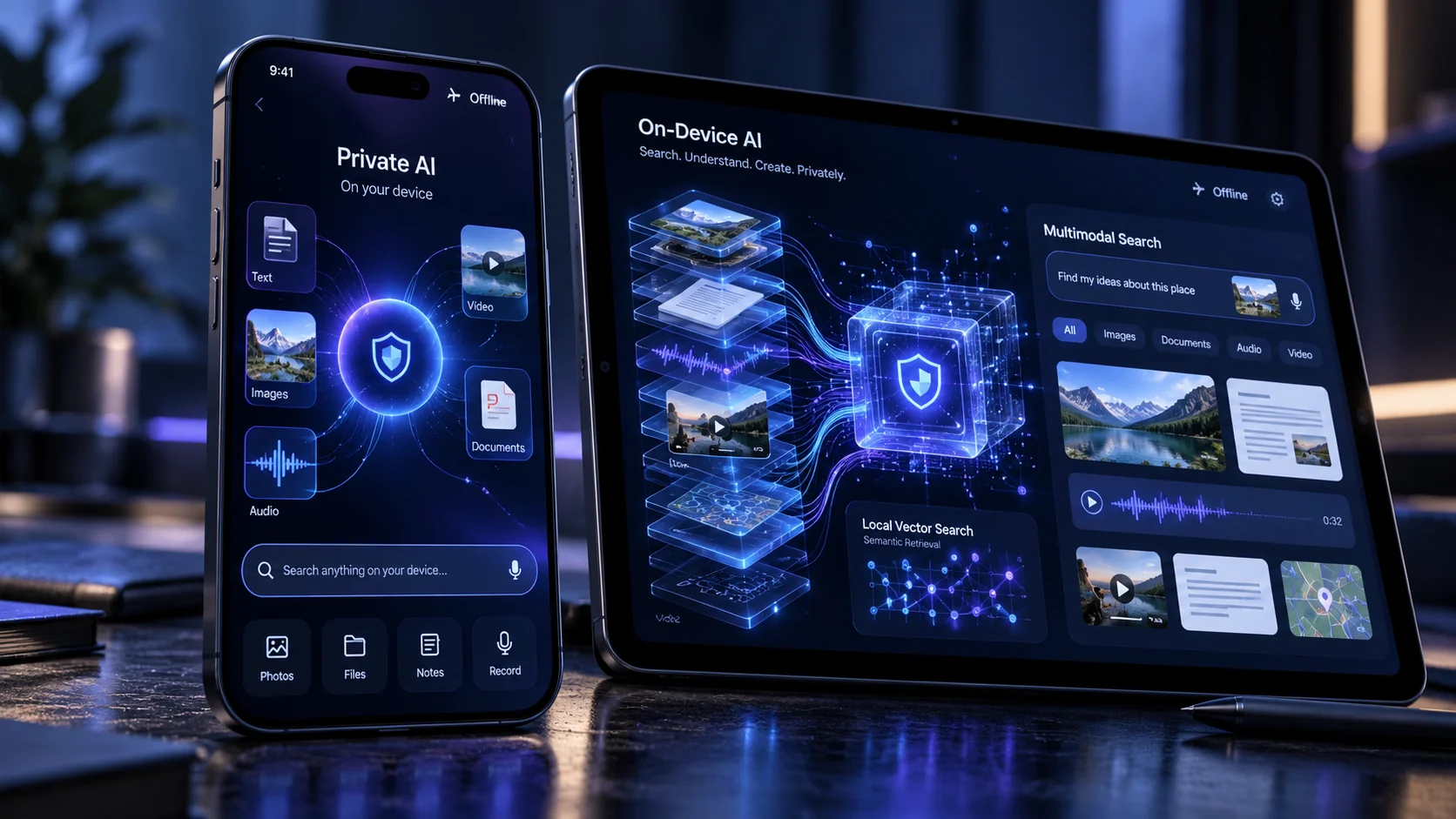
The open model can understand and connect text, code, images, audio and video inside one embedding space.
More importantly, it is designed to run directly on local devices.
That means applications can build powerful search and retrieval experiences without sending every piece of information to a cloud API.
Google announced EmbeddingGemma 2 on October 6, 2026. You can read the official EmbeddingGemma 2 announcement.
So, should businesses move their AI from the cloud to the device?
Not automatically.
This guide explains where local AI makes sense, where cloud AI remains stronger, and how companies can combine both.
What Is On-Device AI?
On-device AI means that some or all AI processing happens directly on the user’s hardware.
That hardware might be:
- A smartphone
- A tablet
- A laptop
- An industrial computer
- An edge device
- A smart camera
The application does not need to send every request to a remote AI server.
For some workflows, it can work even without internet access.
This is very different from a traditional cloud-only AI application.
What Is Google EmbeddingGemma 2?
EmbeddingGemma 2 is Google’s new open multimodal embedding model.
An embedding model does not behave like a normal chatbot.
Instead, it converts information into numerical representations that help software understand similarity and meaning.
That makes embeddings extremely useful for:
- Semantic search
- Retrieval-augmented generation
- Recommendation systems
- Classification
- Intent routing
- Media search
EmbeddingGemma 2 can work across several types of information in the same system.
These include:
- Text
- Code
- Images
- Video
- Audio
Google’s developer guide for on-device multimodal search explains how these capabilities can run locally through technologies such as LiteRT and MediaPipe.
Why On-Device AI App Development Matters Now
Until recently, sophisticated AI features normally required powerful cloud infrastructure.
That created several trade-offs.
The application needed:
- A stable internet connection
- Cloud inference
- API calls
- Server-side processing
- Ongoing inference costs
Local AI changes that architecture.
Some intelligence can move closer to the user.
As mobile hardware becomes more powerful, businesses can create experiences that would have been difficult to run locally only a few years ago.
1. On-Device AI Can Improve Privacy
This is one of its biggest advantages.
Imagine an application that searches through personal photographs.
A cloud-only design may upload images or image representations to a remote service.
A local system can potentially keep that search process on the phone.
The same idea can apply to:
- Voice recordings
- Private documents
- Personal notes
- Internal files
- Photos
- Video libraries
That can reduce the amount of sensitive information leaving the device.
However, local AI does not automatically make an application secure.
The app still needs good authentication, encryption, permissions and secure local storage.
2. Offline AI Can Work Without Reliable Internet
Cloud AI depends on connectivity.
That becomes a problem in environments with weak or unavailable internet access.
Consider:
- Remote industrial sites
- Construction projects
- Agricultural fields
- Warehouses
- Rural healthcare
- Travel applications
A local AI capability can continue working even when the internet does not.
The application can synchronize data later when connectivity returns.
3. Local AI Can Reduce Latency
Every cloud request takes time.
The application needs to:
- Send data across the network.
- Wait for processing.
- Receive the result.
Local processing removes much of that round trip.
For search, classification and routing, this can make the application feel significantly faster.
Google says EmbeddingGemma 2 can also perform local zero-shot intent routing in milliseconds.
4. On-Device AI Can Reduce Cloud Costs
Cloud AI normally has a usage cost.
The amount may be small for one user.
However, it can become significant at large scale.
Imagine an application with one million users performing hundreds of AI-powered searches each month.
If every search requires cloud inference, the cost grows with usage.
Local processing can move some of that work onto customer hardware.
That does not eliminate infrastructure costs.
However, it may reduce the number of cloud requests.
5. Multimodal Local Search Is Becoming Practical
This is where the latest models become especially interesting.
Traditional search often handles one format at a time.
For example:
Text → text search.
Multimodal embeddings allow different forms of information to live in the same semantic space.
A user might search:
“Show me the video where we discussed the damaged red machine.”
The system could potentially retrieve a relevant video segment based on meaning rather than an exact filename.
Another user might upload an image and search for related documents or products.
6. Private RAG Can Run Locally
RAG stands for retrieval-augmented generation.
The basic idea is:
Find relevant information first → give that information to an AI model → generate an answer.
Many RAG applications store document embeddings in cloud vector databases.
However, smaller private knowledge bases can also run locally.
For example, a mobile app might index:
- Employee manuals
- Offline product documentation
- Equipment manuals
- Personal files
- Inspection procedures
The application can search that information even without an active internet connection.
Which Businesses Can Benefit From On-Device AI?
Local AI is not only a consumer-app feature.
Several industries have practical use cases.
Healthcare Applications
Healthcare software often deals with sensitive information.
Keeping appropriate processing local may reduce unnecessary data movement.
However, regulated healthcare applications still need proper compliance and security architecture.
Manufacturing and Field Inspection
A field engineer could use an application to search equipment manuals, classify images or retrieve maintenance information while working in an area with poor connectivity.
Retail
A retail application could perform local visual search or product matching.
Enterprise Applications
An employee might search private files on a corporate device without uploading the full content to an external service.
Media Applications
Users could search personal audio, photos and videos based on meaning rather than filenames.
Example: Offline Equipment Assistant
Imagine a manufacturing company.
Technicians work in locations where mobile connectivity is unreliable.
The company has hundreds of equipment manuals.
A useful mobile application could download the approved manuals.
Then it could build a local semantic index.
A technician might ask:
“Show me the section about pressure loss in model X200.”
The application could retrieve the most relevant manual section without depending entirely on a remote search service.
A cloud model could still be used later for more advanced reasoning if connectivity is available.
Example: Private Photo and Video Search
Consider a media-management application.
The user may have thousands of photographs and videos.
Instead of uploading the whole library, local embeddings can help create semantic search.
The user could search:
“Videos from the beach where someone was playing guitar.”
This is much more useful than searching only filenames and dates.
Example: Intelligent Mobile Document Search
A sales representative may store product catalogues, proposals and technical documents on a tablet.
A local semantic-search feature could make those documents searchable even during travel.
The representative might ask:
“Find the specification sheet that supports high-temperature operation.”
The app could retrieve the most relevant content immediately.
On-Device AI vs Cloud AI
| Factor | On-Device AI | Cloud AI |
|---|---|---|
| Internet requirement | Can work offline | Usually required |
| Data privacy | More processing can stay local | Data may leave the device |
| Latency | Often very low | Network-dependent |
| Model size | Hardware constrained | Can use very large models |
| Reasoning capability | Usually more limited | Often stronger |
| Infrastructure cost | Can reduce inference calls | Usage scales with requests |
| Updates | Device deployment required | Centralized |
When Cloud AI Is Still the Better Choice
Local AI is not a replacement for every cloud model.
Cloud AI remains a strong choice when:
- You need frontier-level reasoning.
- The workflow requires very large models.
- You need centralized knowledge.
- Data changes constantly.
- You need heavy computation.
- Device hardware varies significantly.
For example, a complex business agent coordinating dozens of systems may be better suited to cloud infrastructure.
The Best Architecture May Be Hybrid
Businesses do not need to choose only local or only cloud AI.
A hybrid architecture can use both.
For example:
On device:
- Search local files
- Classify user intent
- Retrieve relevant context
- Work offline
Cloud:
- Advanced reasoning
- Cross-company data
- Long-running agents
- Heavy analytics
This can improve privacy, latency and cost without sacrificing powerful cloud capabilities.
How AI Mobile App Development Changes With Local Models
Mobile development is moving beyond simply calling cloud APIs.
Developers now need to think about:
- Device memory
- Model size
- CPU, GPU and NPU usage
- Battery consumption
- Local databases
- Model updates
- Offline behaviour
This makes architecture decisions important.
The biggest model is not automatically the best model.
How Much Memory Does EmbeddingGemma 2 Need?
Google designed EmbeddingGemma 2 to be modular.
The complete model has 740 million parameters.
However, developers can load only the capabilities they need.
Google reports that its quantized implementation used roughly 191 MB of active RAM for text-only weights and around 567 MB for the full multimodal model on a Pixel 11 Pro.
Real application requirements will vary by device, configuration and workload.
Does On-Device AI Mean No Server Is Needed?
Usually not.
A production application may still require servers for:
- User accounts
- Synchronization
- Payments
- Analytics
- Configuration
- Content updates
- Team collaboration
The difference is that not every AI operation must happen on those servers.
Privacy Still Needs Proper Application Security
Keeping AI local does not automatically make an application safe.
Developers still need to protect:
- Local databases
- Authentication tokens
- Cached files
- Sensitive documents
- Device permissions
The correct security model depends on the application’s risk.
Should a Startup Build On-Device AI?
Only when it solves a real problem.
Do not choose local AI simply because it is new.
Ask:
- Do users need offline access?
- Is the information sensitive?
- Does latency matter?
- Will cloud inference become expensive?
- Can target devices run the model reliably?
If the answer is no to most of these questions, a cloud API may be simpler.
Do You Need a Custom AI Model?
Often, no.
Modern open models can solve many problems without training a model from scratch.
The engineering work is often in:
- Data preparation
- Application integration
- Retrieval
- Evaluation
- User experience
- Security
This is similar to production AI agents.
Our guide to building production AI agents explains why the surrounding application architecture matters as much as the model itself.
How Custom AI Application Development Should Start
Start with the business problem.
Do not start with the model.
Define:
- Who uses the application?
- What information does it need?
- Which data is sensitive?
- Does it need to work offline?
- Which actions happen locally?
- Which actions need the cloud?
Then choose the architecture.
How NRS Technologies Can Build Private AI Experiences
At NRS Technologies, AI development can combine application engineering with the right AI architecture.
Depending on the requirement, that may include:
- React Native mobile apps
- Web applications
- Local semantic search
- Cloud AI models
- Custom APIs
- Vector search
- RAG
- AI agents
- AWS infrastructure
We do not recommend on-device AI simply because it is technically possible.
The architecture should improve privacy, performance, offline capability or cost.
Planning an AI-Powered Mobile or Business App?
If your application needs private search, offline intelligence or fast local processing, on-device AI may now be worth evaluating.
Start with the workflow.
Tell us:
- What the user needs to search or understand
- Which devices they use
- Whether connectivity is reliable
- Which information is sensitive
- Which cloud services already exist
NRS Technologies can then help determine whether the right architecture is:
- Fully local AI
- Cloud AI
- A hybrid system
You can review our selected software projects and learn more about NRS Technologies.
Discuss your private or on-device AI application with NRS Technologies →
Frequently Asked Questions
What is on-device AI?
On-device AI runs AI processing directly on a phone, tablet, laptop or edge device instead of sending every request to a remote cloud service.
What is EmbeddingGemma 2?
EmbeddingGemma 2 is Google’s open multimodal embedding model released in October 2026. It can represent text, code, images, video and audio in a shared embedding space.
Can AI applications work without internet access?
Yes. Some AI features can run completely on local hardware. Whether an entire application can work offline depends on its architecture and data requirements.
Is on-device AI more private than cloud AI?
It can improve privacy because more processing can remain on the user’s device. However, the application still needs secure storage, authentication and permission controls.
Is on-device AI cheaper than cloud AI?
It can reduce recurring inference calls, but development and device optimization also have costs. The best option depends on application scale and workload.
Should businesses use cloud AI or on-device AI?
Cloud AI is often better for complex reasoning and centralized information. On-device AI can be better for privacy, offline operation and low latency. Many applications can benefit from a hybrid design.
Does NRS Technologies build AI-powered mobile applications?
Yes. NRS Technologies builds mobile and web applications and can integrate local AI, cloud AI, semantic search, RAG, APIs and agentic workflows based on project requirements.
Final Thoughts
On-device AI is becoming much more practical.
That does not mean every application should move away from the cloud.
The opportunity is more interesting than that.
Businesses can now decide where intelligence should run.
Keep sensitive or latency-critical tasks close to the user.
Use cloud models when deeper reasoning or centralized information is required.
And combine both when that creates the best product.
If you are planning an AI-powered mobile or business application and want to determine the right architecture, contact NRS Technologies for an AI application consultation.