Google has launched a new AI agent designed to work more like a digital colleague than a chatbot.
The new Google Gemini agent for business can answer questions, create content, write and run code, connect to business systems and continue working on assigned objectives.
Google announced the new agent at Gemini at Work 2026 on October 8.
More importantly, the agent is designed to understand business context and use tools across the applications a company already uses.
You can read the official Gemini at Work 2026 announcement.
That sounds powerful.
However, businesses should not begin with:
“How do we install Gemini everywhere?”
The better question is:
“Which business processes should an AI agent actually handle?”
This guide explains what Google’s new Gemini agent can do, where it may save time and when a business still needs custom AI automation.
What Is the Google Gemini Agent for Business?
The new Gemini agent is designed as a universal agent for work.
Instead of only answering individual prompts, Google says it can accept objectives and work toward a completed outcome.
It can:
- Answer business questions
- Create documents and media
- Write and run code
- Use business tools
- Connect to enterprise systems
- Continue long-running tasks
- Coordinate multiple AI sub-agents
The agent can also work across different devices and interfaces.
Google says it can operate through web, mobile, desktop, command line, Workspace, Microsoft 365 and Slack.
It can also run as a headless agent inside another application.
How Is Gemini Different From a Normal AI Chatbot?
A normal chatbot typically follows a simple pattern.
Question → answer.
A business agent can follow a much larger workflow.
For example:
Goal → collect information → choose tools → perform steps → verify result → return completed work.
This is the same distinction we discuss in our guide to production AI agent development.
An agent becomes valuable when it can safely interact with real business systems.
Google Gemini Can Run Long-Running Tasks
This is one of the more interesting capabilities.
Google says Gemini can continue executing work in the cloud after the user closes their laptop.
That means an agent can potentially handle tasks that take minutes, hours or even longer.
For example, a user could assign:
“Review these customer-support tickets, identify the most common product issues and prepare a report for tomorrow.”
The user does not need to keep an AI chat window open for the entire process.
Gemini Can Create Specialized Sub-Agents
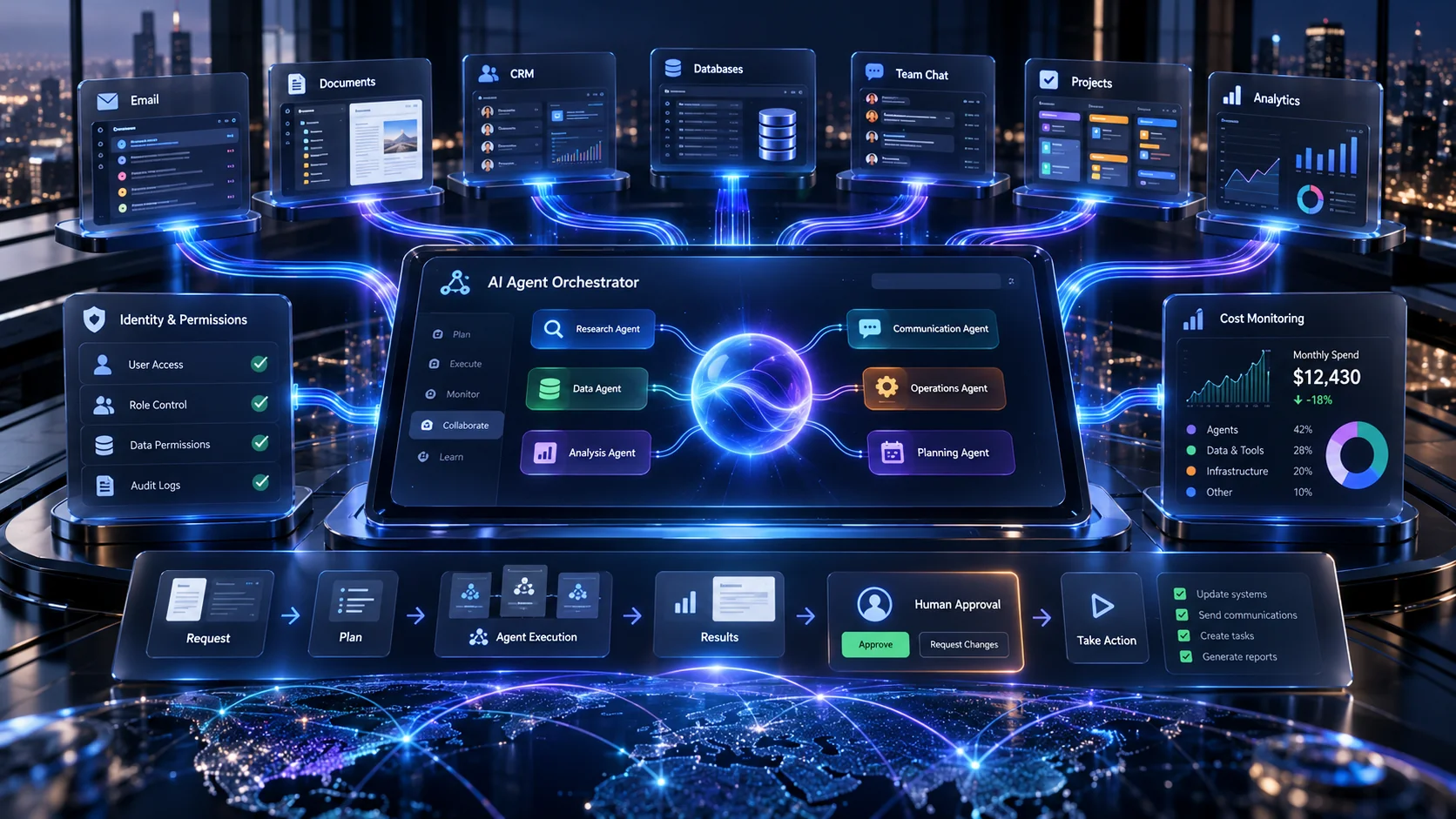
Google also describes a multi-agent architecture.
A larger objective can be divided between smaller specialist agents.
For example, imagine a product-launch task.
One agent could:
- Analyse competitors
Another could:
- Summarize customer feedback
A third could:
- Create a launch brief
The main agent can coordinate those pieces into one final result.
This type of architecture is useful when work contains several parallel or sequential steps.
Gemini Coworker Agents Can Have Their Own Identity
Google is also introducing the idea of coworker agents.
These are persistent agents with defined roles.
Google says these agents can have:
- Their own identity
- Their own email address
- Persistent storage
- Role-specific context
This matters because businesses should know exactly which agent performed a particular action.
Agent identity is also important for security and auditing.
What Business Systems Can Gemini Connect To?
Google says Gemini can work with several common enterprise systems.
Examples include:
- Google Workspace
- Microsoft Office
- Microsoft Teams
- Slack
- Confluence
- Git
- Jira
- Salesforce
- ServiceNow
- BigQuery
- PostgreSQL
- Snowflake
- Databricks
It can also work with Model Context Protocol servers.
This reduces the amount of custom integration required for some workflows.
1. AI Lead Qualification and Sales Automation
Lead handling is one of the most practical automation opportunities.
A workflow could look like:
New enquiry → analyse requirement → classify lead → check CRM → prepare response → assign salesperson.
The agent can reduce administrative work.
However, important pricing or sales decisions can still remain with a human.
2. CRM Research and Sales Preparation
Salespeople often spend time gathering information before a meeting.
An agent could prepare:
- Customer history
- Previous emails
- CRM notes
- Open opportunities
- Recent support tickets
- Relevant documents
The salesperson begins the meeting with better context.
That is more useful than asking employees to search six systems manually.
3. Customer-Support Analysis
An AI agent can analyse support information across many conversations.
For example, it could identify:
- Frequently reported bugs
- Common refund reasons
- Repeated product complaints
- Escalated accounts
- Support trends
The agent could then prepare a structured report for management.
This is different from replacing human support representatives.
The goal is to remove repetitive analysis.
4. Document Review
Document-heavy businesses can benefit significantly from AI.
A workflow might involve:
- Contracts
- Proposals
- Purchase orders
- Invoices
- Internal policies
- Research documents
Google gives several examples of customers using Gemini Enterprise for document-heavy workflows.
One example in its announcement describes automated financial and contractual analysis.
5. Internal Knowledge Search
Company information is often spread across:
- Drive
- CRM systems
- Slack
- Jira
- Databases
- Documents
An AI agent can provide one conversational entry point.
An employee could ask:
“What did we agree with Client X about the API migration?”
The agent could retrieve relevant approved information from connected systems.
6. Project Management Assistance
Project managers spend significant time on coordination.
An AI agent could help with:
- Status summaries
- Task identification
- Meeting notes
- Risk tracking
- Follow-up reminders
- Document preparation
However, final priority and resource decisions still benefit from human judgment.
7. Business Data Analysis
Google is also expanding natural-language analytics.
That can allow business users to ask questions without manually writing complex queries.
For example:
“Which customer segment had the highest revenue growth this quarter?”
The agent can retrieve and analyse connected business data.
This can make analytics more accessible to non-technical teams.
8. Software Development Tasks
Google’s new agent can also write and run code.
That does not mean businesses no longer need developers.
AI is excellent at accelerating:
- Boilerplate
- Tests
- Documentation
- Debugging
- Code analysis
However, production software still needs architecture, testing, security and accountability.
Businesses planning larger systems can explore our custom web application development services.
9. Marketing Operations
An AI agent can assist marketers with:
- Campaign research
- Content briefs
- Performance summaries
- Competitor analysis
- Report generation
However, AI should not turn marketing into mass production of generic content.
The goal should remain useful content and measurable business outcomes.
10. Administrative Work
Many businesses lose hours to small repetitive tasks.
For example:
- Summarizing meetings
- Preparing reports
- Searching for documents
- Following up on tasks
- Organizing information
These are good early automation candidates because the risk is often lower than financial or legal actions.
How Much Does Gemini Enterprise Cost?
Google currently lists a Business edition starting at $21 per user per month.
The Business edition is designed for smaller businesses and teams and supports up to 300 seats.
Google also lists Standard and Plus editions starting at $30 per user per month.
You can verify current pricing on the official Gemini Enterprise product page.
Prices and included usage can change.
Therefore, businesses should check the official page before budgeting.
Google Is Also Introducing AI Cost Controls
AI costs can become difficult to predict when usage increases.
Google’s new enterprise agent includes several cost-management concepts.
These include:
- Model routing
- Multi-model orchestration
- Project-level spend controls
- Usage monitoring
Google says the system can select a smaller or cheaper model when a premium model is unnecessary.
This is a useful principle for custom AI systems too.
The most expensive model should not handle every task.
Gemini Can Use Different AI Models
One particularly interesting change is model flexibility.
Google says Gemini can currently orchestrate across Google’s own Gemini models and Claude models from Anthropic.
Google also plans broader support for private and open models.
This reinforces a key architecture principle.
Your business workflow should not be unnecessarily locked to one AI model.
Google Gemini Agent vs Custom AI Automation
| Requirement | Gemini Agent | Custom AI System |
|---|---|---|
| Google Workspace integration | Excellent | Possible through APIs |
| Common SaaS connectors | Strong | Requires integration |
| Unique business rules | Depends on platform | Full control |
| Customer-facing AI product | Can support integrations | Strong fit |
| Custom UI | Platform-oriented | Full control |
| Custom database workflows | Strong with connectors | Full control |
| Vendor independence | Platform-based | Higher flexibility |
When Google Gemini Is Probably Enough
Gemini Enterprise may be a strong starting point when:
- Your company already uses Google Workspace heavily.
- Your workflows use supported business systems.
- You mainly need internal productivity automation.
- You want an enterprise-managed AI platform.
- You do not need a highly specialized customer-facing product.
In those situations, building an entirely custom platform may create unnecessary cost.
When Custom AI Application Development Makes More Sense
Custom development becomes more attractive when AI is part of your product or competitive advantage.
For example:
- Customer-facing AI SaaS
- AI-powered marketplace
- Custom healthcare workflow
- Specialized recommendation engine
- Unique approval system
- Private industry-specific software
In these situations, you may need full control over:
- Frontend experience
- Backend logic
- Database
- Permissions
- Models
- APIs
- Infrastructure
Security Still Matters
An AI agent connected to business systems needs strong controls.
Google’s enterprise architecture includes agent identity, role-based permissions, audit trails, secure sandboxes and policy controls.
Those are important ideas for any production agent system.
Businesses should always ask:
- Who is the agent?
- What can it access?
- What can it change?
- Which actions are logged?
- Which actions need approval?
For a deeper implementation checklist, read our article on AI agent security in 2026.
Do Not Automate Everything on Day One
Start with one workflow.
A good first project could be:
New lead → analyse enquiry → create CRM record → prepare response → notify salesperson.
Measure:
- Time saved
- Error rate
- Response speed
- Manual steps removed
Then expand only if the workflow creates value.
How NRS Technologies Approaches Business AI
At NRS Technologies, we do not recommend custom AI simply because it sounds more advanced.
The right solution may be:
- Gemini Enterprise
- Microsoft Copilot
- An automation platform
- A custom AI application
- A hybrid architecture
We start by understanding the business process.
Then we map:
- Data
- Applications
- Permissions
- Decisions
- Actions
- Human approval points
Only after that should a company choose the technology.
Planning an AI Automation Project?
You do not need to choose Gemini, Claude or another platform before discussing the requirement.
Start with the problem.
Tell us:
- What your employees currently do manually
- Which applications you use
- Where your data lives
- Which decisions require human approval
- What business result you want
You can review our selected technology projects, read our custom software development cost guide, or learn more about NRS Technologies.
Discuss your AI automation requirement with NRS Technologies →
Frequently Asked Questions
What is the Google Gemini agent?
Google’s Gemini agent is a universal work agent designed to answer questions, perform knowledge work, create content, write code, use tools and complete multi-step business tasks.
Can Gemini connect to business applications?
Yes. Google says Gemini can connect to tools such as Workspace, Microsoft 365, Slack, Jira, Salesforce, ServiceNow, Postgres, Snowflake and other supported systems.
Can Gemini use Claude models?
Google says its agent can currently orchestrate tasks across Gemini models and Claude models from Anthropic, with broader model support planned.
Can Gemini agents run tasks after I close my laptop?
Google says persistent execution allows assigned work to continue running in the cloud after the user leaves the interface.
How much does Gemini Enterprise cost?
Google currently lists Gemini Enterprise Business starting at $21 per user per month and Standard or Plus starting at $30 per user per month. Pricing can change, so check Google Cloud before purchasing.
Should I use Gemini or build a custom AI agent?
Gemini can be a strong option for internal business workflows using supported systems. Custom AI becomes more useful when a company needs unique product experiences, specialized business logic or greater architectural control.
Does NRS Technologies build custom AI automation?
Yes. NRS Technologies builds AI-powered web applications, integrations, APIs and automated workflows based on the systems and business processes involved.
Final Thoughts
Google’s new Gemini agent is another sign that business AI is moving beyond chat.
Agents can now work across systems, maintain context and complete longer workflows.
That creates real opportunities.
However, the goal should not be to automate everything.
Use an existing AI platform when it solves the problem well.
Build custom software when your workflow genuinely needs more control.
And always measure whether the automation saves time, reduces errors or improves revenue.
If you want to identify which option fits your business, contact NRS Technologies for an AI workflow review.